Induction:
Codes and Conventions-
setting: Realism, Atmosphere, symbolism.
Characterisation- sympathetic or unsympathetic.
Mise-en-scene: setting, lighting, costume, special effects, staging/acting, spacing.
The Searchers:
The building and landscape frame the action well, showing the building to be located in the desert, it is also shown to be alone in the middle of nowhere which would be a typical location for a building to be in a western movie. It would be unexpected if the building was in the middle of the city and hundreds of people walking past it daily, a typical western setting is living in broad sunshine and limited food and drink. This is vital for some audiences that have perhaps not seen a western before, it would be important to give the audience the right perspective on how a western is made and planned.
The rule of 3 can be seen below: it is used towards the main character and his trusty horse, the 2 main characters in the whole film, the image is to recognise the hero and his trusty sidekick, the two most known characteristics in film as a whole.
Leading Line- This refers to the technique of a composition which the viewer has the attention towards the image is drawn to lines that lead to the main subject of the image. A leading line shows an easy path for the eye to follow through different elements of a photo.
Symmetrical and centred composition- Two images side by side that are the same size and height as well as centred composition which is the difference in size and height yet still being symmetrical, for example below:
The transitions in sherlock:
Transition/pass-by effect:
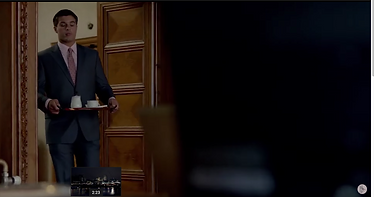
This shows the process of a change in scene and time, perhaps their are two storylines currently happening through the programme and the transition switches from one storyline to another to keep the audience on track and not to focus on just one throughout the entire episode.
Sound to process more anticipated cuts:
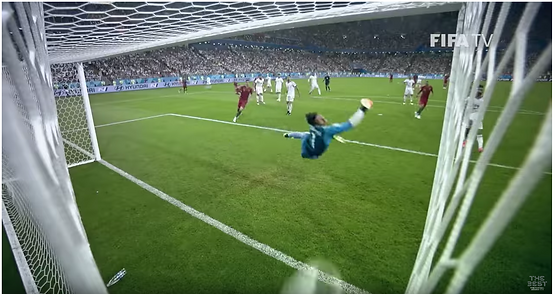
Animation helps with these cuts, the audio effects that go along with them help the audience to really understand what is going on, it also helps each cut seem more believable and that it is happening in real time rather than pre-recorded or edited in numerous different shots and angles. it can also be used to set the scene or changing one scenario to another, the anticipation is fantastic when it comes to sound.
Frame within a frame:
Filming a scene with two separate angles to two alternate cast members, appearing in the same scene, this is to get the emotion and climax from both actors perspective, a cast actor may act in a different way to the other depending on if certain information has effected one or the other.
180 degree rule- The 180 degree rule is a cinematography guideline that states that two characters in a scene should maintain the same left/right relationship to one another. When the camera passes over the invisible axis connecting the two subjects, it is called crossing the line and the shot becomes what is called a reverse angle. Reversing the angle is commonly thought to be disorienting and can distract the audience from the intent of the scene.
Level 3 yr 2 Induction 2 Poem project:
Mindmap:
Mood boards:
Composition, Graphics, live footage and animation:
https://www.youtube.com/watch?v=ssFXi3WPDpA
https://www.youtube.com/watch?v=Vp-wLiW-N3Y
Transitional shots below:
https://www.youtube.com/watch?v=ILOFwBBcGv4
Static Imagery:
change of poem:
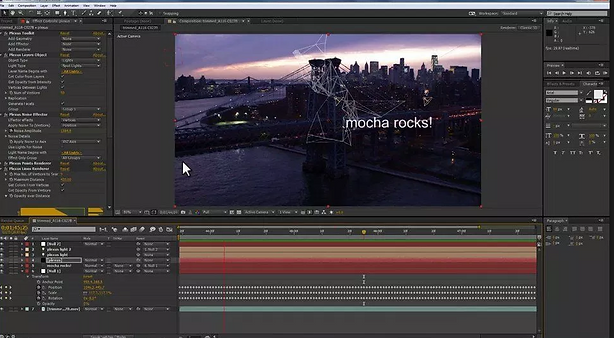
Adobe after effects ( conventions ).
Masking - The Transcript of Types of Animation. Masking within in animation is when you cover part of a scene to insert something else later on. A traditional technique was chroma key, but now a days it can be done digitally. Chroma Key is a special effect that layers two or more images or video's together.
Motion Tracking:
In cinematography, match moving is a cinematic technique that allows the insertion of computer graphics into live-action footage with correct position, scale, orientation, and motion relative to the photographed objects in the shot. Motion tracking may refer to: Motion capture, the process of recording the movement of objects or people. Match moving, a cinematic technique that allows the insertion of computer graphics into live-action footage with correct position, scale, orientation, and motion relative to the objects in the shot.
Reflection on experiments in Adobe After Effects:
The poem I used by William Wordsworth:
Calm is all nature as a resting wheel.
The kine are couched upon the dewy grass;
The horse alone, seen dimly as I pass,
Is cropping audibly his later meal:
Dark is the ground; a slumber seems to steal
O'er vale, and mountain, and the starless sky.
Now, in this blank of things, a harmony,
Home-felt, and home-created, comes to heal
That grief for which the senses still supply
Fresh food; for only then, when memory
Is hushed, am I at rest. My Friends! restrain
Those busy cares that would allay my pain;
Oh! leave me to myself, nor let me feel
The officious touch that makes me droop again.
Tools and processes used in adobe after effects- Masking, Motion tracking and static imagery, however I struggled with understanding how each of these tools work and can defiantly need the help with learning how adobe after effects is used within media, graphics and potential live footage. As I’m not confident with using Adobe after effects I would have to say that these tools and processes weren’t used effectively and that I need to understand more on how each of them work and can then be used when it comes to filming and photography. To improve I need to ask for help when using adobe after effects so that I can then use it to the best of my abilities and know how several tools work specifically and what effect it'll have towards a still image or a short video. The aspects that were most successful were the possible collaborations and fading text which can be seen below:
Music video (Unit 9):
For example- https://www.youtube.com/watch?v=hkDGGsuVKVo
Chase and status- all goes wrong. feat. Tom Greennan, choice 1.
This video includes techniques such as leading line, Sfx and static imagery. The leading line can be seen from the image of the singer/artist lying in the coffin: this can refer to the technique of a composition where the viewer of your photos attention is drawn to lines that lead to the main subject of the image. It paves an easy path for the eye to follow through different elements of a photo. Usually they start at the bottom of the frame and guide the eye upwards and inwards, from the foreground of the image to the background, typically leading toward the main subject.The easiest place to find a leading line is on a road. Roadways are inherently leading because they go somewhere, give us a feeling of motion, and the lines often point so far inwards that they reach a vanishing point – the place where two or more lines converge into theoretical infinity. Static imagery is defined by an image that doesn't move for example; a poster, a billboard or albums/film covers. For example, the image of the statue taken from the chase and status music video, is a still image as it doesn't move unless someone touches it, which in this case it doesn't, the camera zooms in towards the statue, this is to make it look like the image is more noticeable and demanding ( an important part for the music video as it may help tell the story that the music video is trying to get across to its audience.
Chosen music video for production choice 2- Love it if we made it by the 1975:
We're fucking in a car, shooting heroin
Saying controversial things just for the hell of it
Selling melanin and then suffocate the black men
Start with misdemeanours and we'll make a business out of them
And we can find out the information
Access all the applications
that are hardening positions based on miscommunication
Oh Fuck your feelings
Truth is only hearsay
We're just left to decay
Modernity has failed us
And I'd love it if we made it
Yes, I'd love it if we made it
Yes, I'd love it if we made it
Yes, I'd love it if we made it
And poison me daddy
I've got the Jones right through my bones
Write it on a piece of stone
A beach of drowning three-year-olds
Rest in peace Lil Peep
The poetry is in the streets
Jesus save us
Modernity has failed us
And I'd love it if we made it
Yes, I'd love it if we made it
Yes, I'd love it if we made it
Yes, I'd love it if we made it
And I'd love it if we made it
And I'd love it if we made it
And I'd love it if we made it
I'd love it if we made it
Tell me something I didn't know
Consultation
Degradation
Fossil fuelling
Masturbation
Immigration
Liberal kitsch
Kneeling on a pitch
"I moved on her like a bitch"
Excited to be indicted
Unrequited house with seven pools
"Thank you Kanye, very cool"
The war has been incited and guess what?
You're all invited
And you're famous
Modernity has failed us
And I'd love it if we made it
And I'd love it if we made it
And I'd love it if we made it
Tell me something I didn't know
And I'd love it if we made it
And I'd love it if we made it
And I'd love it if we made it
And I'd love it if we made it
The meaning behind certain quotes and lyrics taken from the song:
“Immigration liberal kitsch/kneeling on a pitch”
Matty hits back at the right-wing response to the immigration debate that is blighting political discourse in the UK, US and across the globe, he also makes reference to the ongoing kneeling protests in the NFL.
San Francisco 49ers’ quarterback Colin Kaepernick wasn’t the first to protest, but certainly the most influential. During a preseason game in 2016, he took a knee during the US national anthem in protest to police brutality and racial inequality in the country. His example lead several other players to begin using the opportunity to protest throughout the 2016 season and beyond. Critics said that the protests were unpatriotic and disrespected the American flag, whereas those players responded by saying they were merely exercising their right to their freedom of speech. In September 2017, over 200 players protested after President Trump suggested that players should be fined or sacked for joining in. As a result, Kaepernick was essentially blacklisted by the league following his protests and has not played a game in the NFL since his contract with the 49ers expired in 2017.
“I moved on her like a bitch!”
In the final verse, Matty quotes directly from President Trump and a recording made of him in 2005 with TV personality Billy Bush. Bragging about his sexual prowess with women, Trump said that he “moved on her like a bitch”, and later went onto say that his star power allowed him to “grab ’em. "You can do anything.”
Thank you Kanye, very cool!”
His second direct quote is in reference to endorsements from Kanye West on Twitter. In April 2018, Kanye called Trump his “brother” and said that they both had “dragon energy”. Trump would later retweet the message with the message, “Thank you Kanye, very cool!”.
In November 2016, Kanye declared himself a fan of Trump and was pictures with the President-elect in Trump Towers. He faced widespread criticism from the hip-hop world, but repeated his support in April 2018 when he returned to Twitter following a lengthy absence.
Music video production, choice 3: Panic at the disco- high hopes.
https://www.youtube.com/watch?v=IPXIgEAGe4U
The meaning behind the lyrics:
The lyrics of “High Hopes” are a reflection on the journey from failure to accomplishing one’s dreams. Urie’s narrator has reached what he had aimed for in life, and now he is looking backward at the struggle his life used to be and how he made it to where he is now. However, the lyrics don’t tell us where exactly the narrator has come. And that’s because the meaning of the song has less to do with the destination than it does with how one gets there. “High Hopes” tells a story about succeeding in the labor to achieve one’s dreams.
Had to have high, high hopes for a living
Shooting for the stars when I couldn’t make a killing
Didn’t have a dime, but I always had a vision
Always had high, high hopes
Had to have high, high hopes for a living
Didn’t know how but I always had a feeling
I was gonna be that one in a million
Always had high, high hopes
The central theme of the song is hope, so naturally that is the focus of the chorus. Urie was struggling “for a living,” so he “had to have high, high hopes.” Hope was necessary because his situation was bleak. He was “shooting for the stars” even though he “didn’t have a dime.” He was broke, but he “always had a vision,” so he always maintained high hopes. He emphasises the significance of his dreams by doubling the word “high.” It wouldn’t be enough to just make life a little easier, he longed to accomplish hopes that are far beyond the circumstances that he was living in. And even though he “didn’t know how” he was going to succeed, he says, “always had a feeling that I was gonna be that one in a million.” This almost sounds conceited at first, but he isn’t saying he wants to be better than everyone else. He simply wants to have the kind of uniqueness that comes from the hard work of following through on a dream.
Music video production choice 4: MGK ( rap devil )
Verse 1:
MGK attacks the personal looks of Eminem. Em has gone without a beard almost his entire career but has grown a beard since 2016. MGK calls it ‘weird.’ Weak attack. He also says Em talks tough but pays millions for personal security. No real connection with each other.
Next, MGK references to Eminem’s track “My Dad’s Gone Crazy” from the ‘Eminem Show’ album. MGK reassures that he has considering ‘Kamikaze’ album is dedicated to attacking some artists by name and others in general. MGK brings up the reason for their bubbling feud in “Rap Devil.” He Tweeted that Eminem’s daughter looks “hot as hell” back in 2012. At the time he was 16 years old. Eminem brought this up in “Not Alike” calling MGK a coward to diss on a track he was featured on by Tech 9. MGK slaps back at Em saying it took Eminem 6 years to come back with a response to his Tweet.
Chorus:
These lyrics are MGK’s debating points with Eminem. He wants to talk about how Eminem’s go-to attire is ‘sweatsuit.’ He wants to talk about how Eminem is rich and he is still mad. According to wealthygorilla.com, Eminem is valued at $190 million in 2018, whereas the same website determines MGK’s net worth to be $8 million. Also, MGK wants to talk about how both of them are single dads from Midwest region. Eminem is from Detroit, Michigan, and MGK resides in Cleveland, Ohio. Eminem has a daughter-Hailie Jade Mathers, and MGK has a 10-year-old daughter-Casie Colson Baker.
If not for these topics, MGK suggests he would size Em up and draw chalk lines around him, referencing to crime scene markings around a dead body.
Music video production: choice 5 - Eminem ( Killshot ).
Meaning behind the lyrics are explained here by DJ and artist, Randolph:
https://www.youtube.com/watch?v=C2a3KlrmZqg
S.w.o.t analysis for 3 of my 5 chosen songs:
The 1975- love it if we made it:
Panic at the disco-high hopes:
Eminem- Killshot.
Chosen video for my music video production:
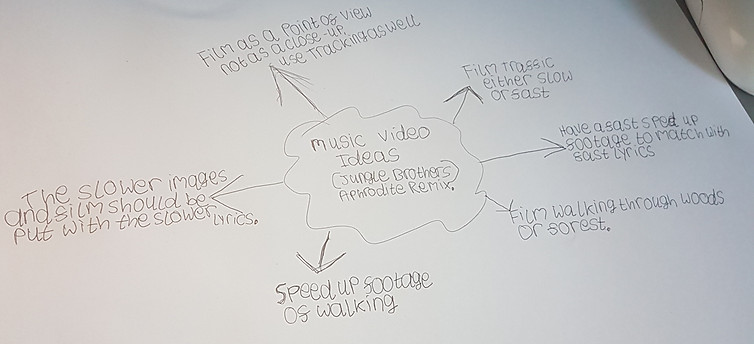
Jungle brothers- jungle brothers ( Aphrodite remix )
mindmap:
How i began to learn time- lapsing and editing in adobe after effects and adobe media encoder:
Step 1: We'll start by importing the clip into Adobe After Effects. We'll create a new composition and choose a 1080 preset (Figure 1, below). Next, we'll add a 2K or even a 4K clip to the timeline. Choosing a 1920x1080 present in the Composition Settings dialog
You can turn the audio off for this clip by selecting the speaker button to the left of your clip (Figure 2, below), since we're not concerned with audio for this project.
Step 2:
Click here to turn off audio for the clip.
The first step we'll take is to adjust the duration of our clip from just under 8 minutes down to 10 seconds. You can do this by right-clicking in the Duration area and scrolling down to Columns (Figure 3, below). Here, you want to make sure that the check mark next to duration is enabled.
Step 3:
Click here to open the Time Stretch dialog.
Now, we can alter the duration of this clip and have After Effects do the math for us. We know we want a finished clip length of 10 seconds, so let's enter that as the new duration in the Time Stretch dialog. Press OK. Now After Effects has adjusted the length of our clip to fit the 10-second duration. Do a RAM preview to see what clip looks like sped up from 7 minutes, 58 seconds to 10 seconds.
Step 4:
Adjusting duration in the Time Stretch dialog
Step 5:
Enabling Frame Blending
Step 6:
The Toggle Switches/Modes button
Enable Motion Blur:
enable another option called Motion Blur.Do this universally and then also to the clip itself. You can see the effect in the RAM previewed after.
Enabling Motion Blur:
The Slider and Jib Effect
Just with these two options enabled, we start to see a powerful sense of motion in this time-lapse. Now, we're ready to add the slider or jib effect to this project. As a reminder, we have extra pixels to work with since we have 2K source footage. Now, we can reposition our video and have it move over time by adding a few keyframes.
With the clip selected, press P to reveal the Position values (Figure 8, below). Make sure the playhead is at the beginning of your clip. Now we can begin to reposition our video. We want to start from the upper left and then pan and tilt down to the right. We'll enable keyframes by clicking the watch button to the left of the Position values and adjust our starting values.
Position values revealed and ready to adjust.
Next, we'll right-click our starting keyframe and choose Keyframe Assistant > Easy Ease Out (Figure 9, below). Next, we'll move to the nine-second area where we want our move to land. Here, again, we can reposition the video by adjusting our values to the left and to the right.
Adding an Adjustment Layer:
Choosing the Brightness & Contrast effect
Dragging to the right on this value in the Effect Controls panel will increase the contrast to our video. We can also go back to Effect > Color Correction, and this time, choose Vibrance. Here, we can add some more color to our video by, again, dragging to the Vibrance value to the right.
Unit 9-Music Video, composition and Motion Blur:
Composition below:
Motion Blur below:
Unit 9 video:
Peer Assessed by Dominic Cornford:
Positives:
Their is a variety of time lapsing and compositions used throughout and to break each down into three videos shows understanding and learning from previous videos shown to the whole class. There is also clear use of adobe after effects and this video has been edited very well. I believe that he has improved knowledge now of using after effects, premier pro and the media encoder which can be used in his FMP to create a in-depth video, photography timeline or podcast. The video can be used as a guideline for some that may have struggled editing and finalising their videos and should then compare theres to this as it has a lot of what was asked at the start included. In my opinion this video should be graded at a pass as their is improvements that can be made and that i will talk/discuss about below.
Negatives:
I have a few improvements that Luke can make so that his editing Skills are at the highest possible quality when making his FMP, he tried to create a motion blur for his video that didn't go as he expected. I am willing to help him with this when editing in the future so that not just my video but his as well can be used by others as a potential example for future students can follow. I wouldn't agree with the song choice that Luke went with when considering all the other choices he had at the beginning of this unit, I think that he should have included more in-depth features in his video such as fast-forwarding, re-winding and fading in and out/transitioning, I hope that Luke can read through these improvements carefully so that his FMP is to the highest quality.
My Evaluation:
In my opinion my unit 9 project has had many points where I've had to think about what would be best, I can admit that some of the choices I made were good and some weren't. For example the songs that I chose prior to filming or the mind maps that I did before changing my mind and having to do one for my final song that I chose to do it on. I believe that I have understood the aspects of filming and editing a music video and if asked to complete a similar task to this in the future their won't be any worries and I will be able to finish with no issues. This being the first time I have produced anything like this, I have learnt a lot and I'm happy that I can take this into the future whether that be into university or working for a smaller production company I will be happy to have people to rely on me to get the best out of a musical production when it comes to editing, including motion-blur, compositions, transitions and time-lapses.